Server Upgrade, Remote Desktop Auth Fix
The document is intended to be followed only by FVC staff/vendors who have already completed the Server Upgrade instructions, linked here.
To ease the transition we've kept the password the same across both servers, but the username can change a bit. If you see a message stating The User Account Did Not Work cancel the connection request. We will edit the single account to work on both servers.
Continue with this process only if you have authentication issues.
- Microsoft Remote Desktop should already be open.
- Select the
Microsoft Remote Desktopmenu, thenPreferences:
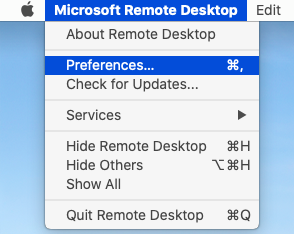
- Switch to the
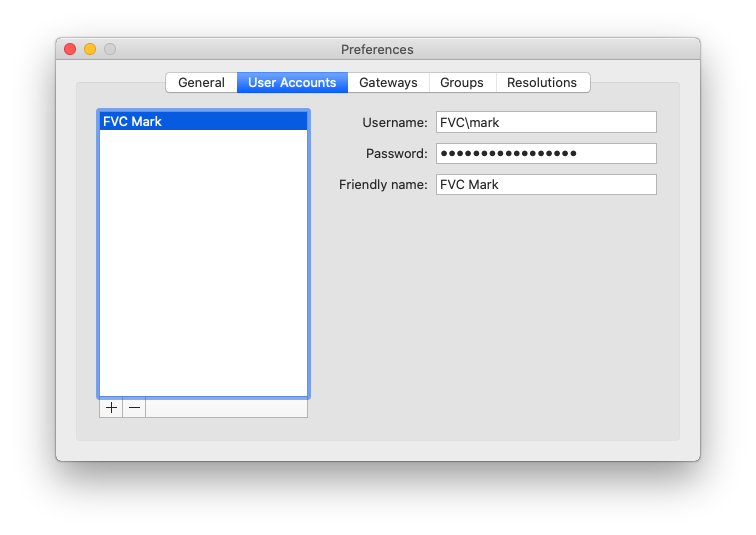
User Accountstab and locate theUsernamefield. Obviously replace Mark's name with your own, generally lower case only.
-
Change from
FVC\usernametousername@ad.foleyvisioncenter.com.- e.g. `FVC\mark` to `mark@ad.foleyvisioncenter.com`.
Make sure you use ad.foleyvisioncenter.com and not just foleyvisioncenter.com! The AD stands for Active Directory.
This new username will work with both old and new servers.
Here's what an old/incorrect entry looks like:
And here's a new/corrected entry:
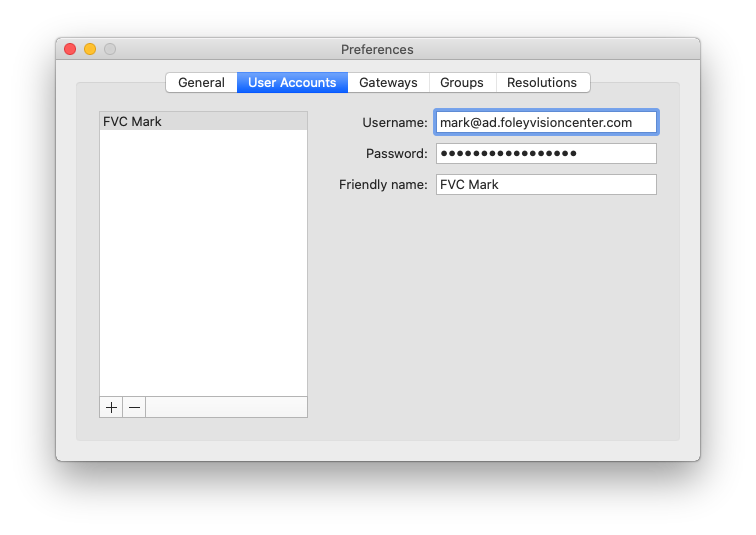
Friendly namecan stay the same.
- Close the
Preferenceswindow and test the new connection.
- If you are still running into error messages, return to the main Server Upgrade instructions linked at the top of this page and look at the other troubleshooting options.