Server Upgrade
April 2022
This guide covers how to get you connected to the new server at FVC. We will use an existing entry for the old server, duplicate & customize the new entry, then test the connection.
To get us to a starting point, log into your computer and open the Microsoft Remote Desktop application. The icon looks like this:

- With Microsoft Remote Desktop open you will now see either connection entries in icon view or list view. Select the one you usually connect with. Name will probably be
OfficeMateorfvcvm2. Right-click (or control+left-click) the entry and select Duplicate:
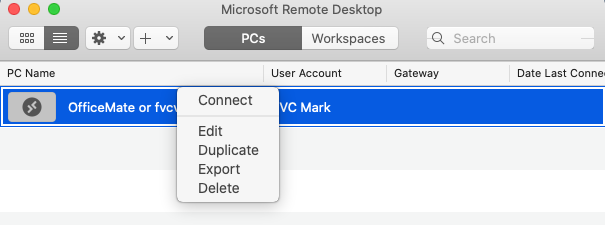
- You'll have two identical entries. Right-click (or control+left-click) one of them - doesn't matter which one - and choose
Edit.
- Change the
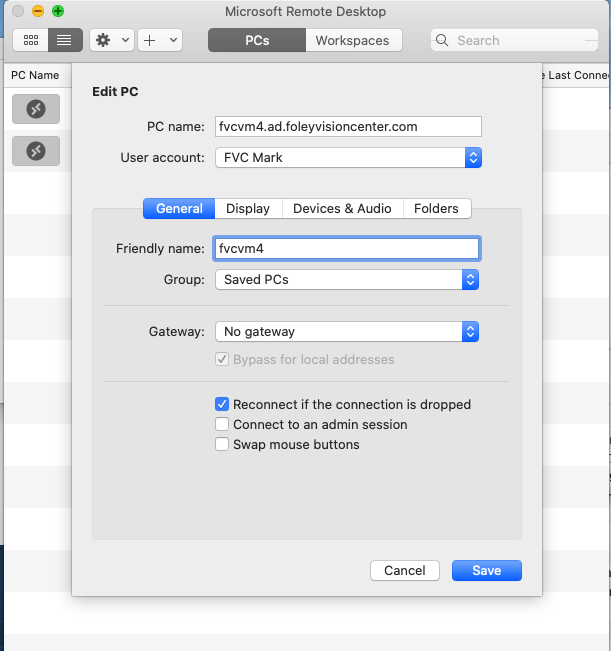
PC namefromfvcvm2.ad.foleyvisioncenter.comtofvcvm4.ad.foleyvisioncenter.com
- Change the
Friendly nametofvcvm4and click Save. If another name makes more sense to you, thisFriendly namefield can be modified, but please make some reference to fvcvm4 or "new server" or something like that. Or rename the old server to say "old." Should look very similar/identical to this:
- Try double clicking the new entry. Best case, you're done! If you see any kind of error message please see the notes below. You may have to follow one or more of them to get fully connected.
Not working? The problem is almost certainly one of two issues.
- Auth (user/pass) doesn't work. To ease the transition we've kept the password the same across both servers, but the username can change a bit.If you see a message stating
The User Account Did Not Workcancel the connection request. We will edit the single account to work on both servers. Auth solution linked here.
- Computer can't find the new server. Solution linked here. Though, make sure your VPN is connected if you're remote.
If neither of the solutions work or you've reached the end of what you're willing to do, please reach out to Mark or Brandon for help, we are happy to help!