
TG Telzio User Guide
This guide covers the first time user setup process, from a user perspective.
First Login
- Login at https://telzio.com/login using the Google Chrome web browser.
- Firefox and Safari are superior for privacy purposes, but Telzio was coded with Chrome in mind and Chrome is required to record an outgoing greeting in acceptable quality.
- Username is your full name, lowercase, all one word.
- e.g.
Dana Turell's username isdanaturell. - e.g.
Jeannie Bealer's username isjeanniebealer.
- e.g.
- Password is the same as your primary email password.
- Please ask one of the following people if you don't know your password:
- Mark Reinmuth - 541.912.6453
- Brandon Clark - 541.961.7043
- Kurt Booker - 541.913.9212
- Please ask one of the following people if you don't know your password:
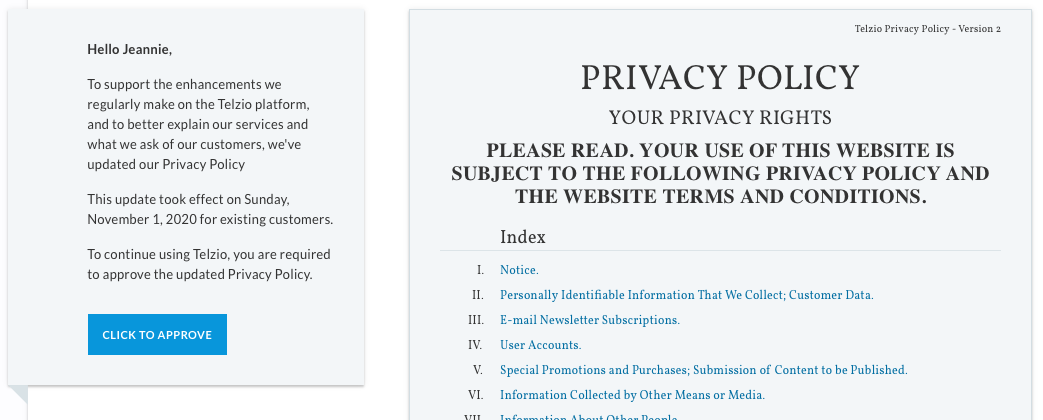
- Since this is your first login, you'll be asked to review the privacy policy:
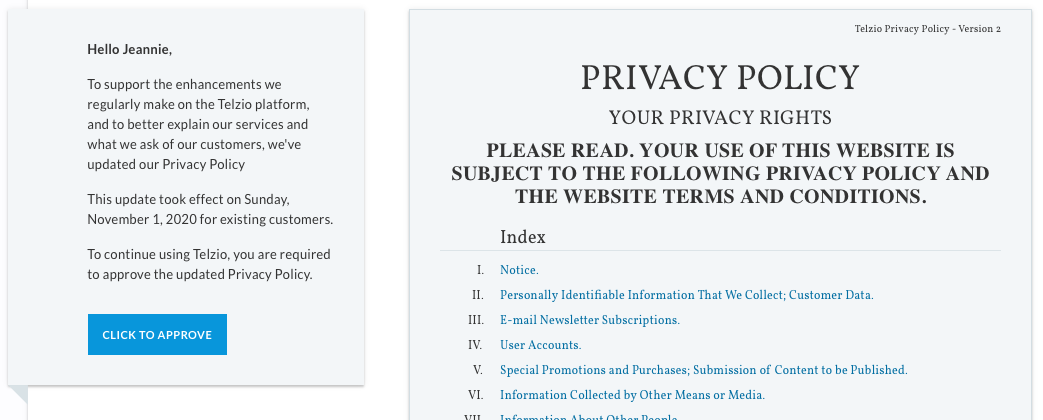 If you approve, click the blue button
 Click to approve. - You'll be taken to your Dashboard.
Basic settings - required!
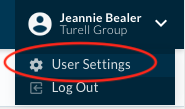
- From the user menu in the top right corner, choose
User Settings:
- Scroll down to the
Voicemail Greetingsection. - Under
Add New Greeting, clickRecordand follow the prompts. You can record as many times as you need to, and preview it after each recording. When finished, make sure to clickUpdate Greetingor your recording will be lost. - Optional: Feel free to set a voicemail PIN or to enable two factor authentication.
Mobile Setup, iPhone
- Either:
- A) Open
App Store->Search-> enter "Telzio"
or
- A) Open
- B) Use this link on your phone: https://apps.apple.com/us/app/telzio/id954687677
- Obviously, it's not going to be much good without microphone access!
- Tap the gear icon in the top right hand corner.
Preferences -> Ringtones. Self explanatory from there.
You can now make calls from the main Turell Group phone number of 541.685.5000, or receive calls from folks that call in and enter your extension, or use the directory.
Mobile Setup, Android
- No setup guide available at this time. Please let Mark Reinmuth know (and cc your manager) if you would like to see a guide for Android.
Notes
- We do not anticipate